

Multi-agent profiles
You can run a team of Execute-stage workers where each one runs on a different LLM and carries its own tuned system prompt, and let Studio route each slice to the right worker automatically based on which files that slice touches. This guide builds one such team end to end: Opus for planning, Sonnet for frontend, Haiku for backend.Two kinds of profile
The setup rests on two distinct objects. Keep them straight and everything else follows.
A Model Profile answers “which LLM do I connect to?” A Pipeline Profile answers
“what does this worker do, on which files, and on which model?” One Model Profile
can back many Pipeline Profiles.
Where the default model comes from
Agent Topology sets the default Model Profile for each pipeline stage (Orchestrate, Plan, Execute, Review, Merge, Reconcile). A Pipeline Profile that binds its own Model Profile overrides that stage default when its file scope matches. A Pipeline Profile that binds no model inherits its stage’s default from Agent Topology. That inheritance is what makes this feature back-compatible: nothing about an existing setup changes until you bind a model to a profile. The seeded empty-scopeworker Pipeline Profile keeps running on the Execute-stage default exactly as
before.
How routing works
At fan-out, the planner splits a goal into slices and each Execute slice is matched against your Pipeline Profiles’ file scopes. The rule is strict:A slice is routed to a Pipeline Profile only when every file in the slice matches at least one of that profile’s glob patterns, and exactly one profile matches.Anything else — zero matches, a partial match (some files match, some don’t), or two or more profiles matching — falls through to the default empty-scope worker. This means the granularity of your slices decides whether domain routing fires. A slice that touches only
.tsx files can match a frontend-only profile; a slice
that touches both .tsx and .cs matches neither a frontend-only nor a
backend-only profile, so it lands on the default worker. If you want domain routing
to trigger reliably, keep slices within a single domain.
Walkthrough: Opus plans, Sonnet builds frontend, Haiku builds backend
1. Create the Model Profiles
In the Model & Agent Studio, create one Model Profile per LLM you want to use. These are just connections and can be reused by any number of Pipeline Profiles.2. Create the scoped Pipeline Profiles
In the Pipeline Profiles editor, create the workers and planners below. Each one picks a stage, a file scope, and a bound Model Profile.
Give each profile its own tuned system prompt and tool allowlist — that is the point
of splitting them. A frontend worker can be told about your component conventions; a
backend worker can be told about your service layering.
3. Set the Plan-stage default
In Agent Topology, set the Plan stage’s default Model Profile toopus-plan so
that planning runs on Opus by default, even for goals the docs-planner scope
doesn’t match.
4. What happens at runtime
- A goal arrives and the planner fans it out into slices.
- Each Execute slice is matched against the Pipeline Profiles’ file scopes.
- A slice that matches exactly one scoped profile runs that profile’s prompt and
tools, on its bound model — a pure-frontend slice on
sonnet-frontend, a pure-backend slice onhaiku-backend. - A slice that matches zero or more than one profile — including any mixed slice
touching both frontend and backend files — runs the default
workeron the Execute-stage default model.
Planning routes the same way
File-scope routing is not Execute-only. It applies to Plan-stage profiles too, so you can put a docs-planner on a cheap model and a backend-planner on a strong one and let the goal’s files decide which planner runs. Thedocs-planner above is an
example: a docs-only goal gets planned on opus-plan through the profile, while
other goals fall back to the Plan-stage default you set in Agent Topology.
Recursive planning — decompose a slice instead of forcing it into one worker
By default a plan is one level deep: the planner splits the goal into slices and every slice is a leaf that runs as a single worker. That’s fine when each slice is worker-sized, but a goal like “a React UI, a .NET API, and the services behind it” has slices that are really whole subsystems — cramming each into one worker (or splitting so finely up front that the top-level planner has to reason about every file) is exactly where flat fan-out strains. Recursive planning lets a planner mark a slice as compound. A compound slice isn’t run by a worker — it’s handed to its own sub-planner, which re-slices that one subsystem into a smaller sub-plan. Those grandchildren fan out, execute, and then reconcile bottom-up through the interior node back to the goal: the sub-plan’s children merge into the compound slice, and the compound slice merges into the root, using the identical review/merge machinery a flat fan-out already uses — just one layer deeper. Each subsystem gets its own focused planning pass, on whichever Plan profile its files route to (see above), instead of one over-wide top-level slice list.Turning it on — Max plan depth
Recursive planning is gated by Max plan depth (Goal Workspace → ⚙ Settings → Planning):
The planner is told how many layers remain and decomposes accordingly — closer to the
ceiling it widens (more leaves) rather than nesting further, so depth is a budget, not
a target.
Each goal can override the global default with the Plan depth control in the Goal
Workspace’s Review/Target row. It’s pre-filled with the current default; change it to
steer just that run (e.g. bump one genuinely multi-subsystem goal to
2 while the
session default stays 1).
Depth is config, not a rewrite. Nothing in the DAG, reconciliation, or credential
resolution is depth-bound — a compound child is spawned through the same path a
reconciliation unit uses, plans itself, and rolls up like any other work unit. Leaving
Max plan depth at
1 keeps today’s behavior exactly.Peer contracts — keep parallel slices coherent
Two sibling slices that must agree on an interface — a backend endpoint and the frontend that calls it — often touch non-overlapping files, so there’s no file conflict to catch them disagreeing. They can each invent a slightly different shape and still merge clean but broken. To close that gap, a planner can author a small shared contract (an id plus a compact typed shape — an endpoint list, a field set) and mark which slices provide it versus consume it. The contract is:- injected into both workers, so the producer and the consumer build against the same declared interface concurrently — no need to serialize one behind the other; and
- injected into the reviewer, which checks conformance and rejects a non-conformant peer (a consumer calling a field the contract doesn’t declare) instead of letting it merge.
provides /
consumes its parent slice declared and may author new internal contracts among its
own children — so a deep tree doesn’t reinvent a shared interface at every level. This
is authored by the planner as part of the plan; there’s no separate UI step.
Seeing the whole decomposition — Pathways → Plan
Because a recursive plan is a tree, the Pathways panel has a read-only Plan sub-tab that draws it: the root goal at top, its child work units below, recursively. It’s where you understand the shape of a decomposition (the Goal Workspace Decision Tree is where you act on it).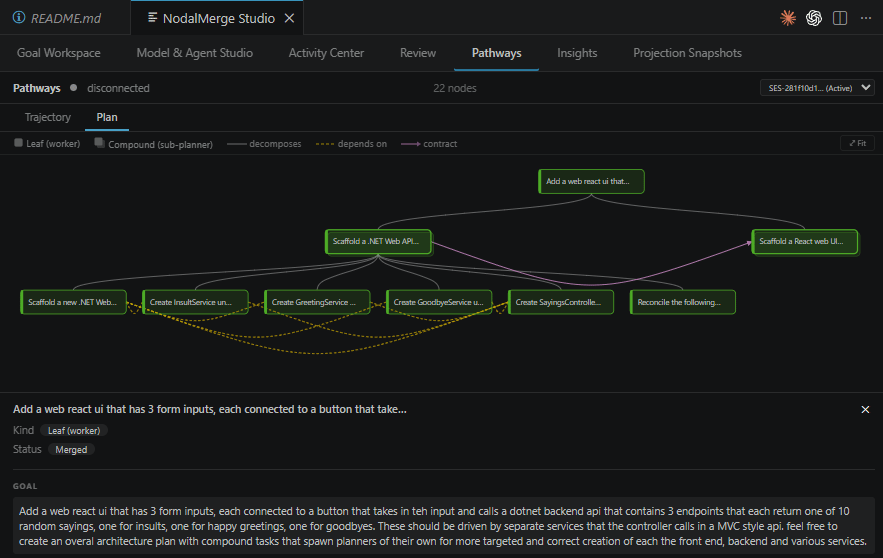
- Leaf vs Compound nodes — a compound slice (sub-planner) is drawn distinctly, so you can see exactly where the plan went recursive and where it bottomed out at workers.
- Status tint — nodes are colored by their work unit’s status, so you watch a merge climb the tree bottom-up as grandchildren reconcile into their parent and the parent into the root.
- Edges make the otherwise-invisible coordination visible: solid decomposes, dashed depends on, and a purple arrow for each contract (provider → consumer) — the peer contracts above, drawn as links.
Remember
Routing is all-or-nothing and single-match. A scoped profile runs only when
every file in the slice matches its globs and it is the only matching profile.
A mixed slice — say one that edits a
.tsx component and its .cs API together —
matches no single-domain profile and falls through to the default worker. Slice
granularity is what makes domain routing fire.Keep the default worker. The seeded empty-scope
worker is the catch-all for
everything that doesn’t route cleanly. It runs on the Execute-stage Model Profile
from Agent Topology, so it always has a model even when you’ve bound none to it —
though you can bind one to it directly if you want a specific catch-all model.