

Control Tower UI reference
Every user-facing action in the NodalMerge Studio VS Code extension, organized by panel — the practical “what can I click” companion to How Studio works and to Reference → API surface’s backend catalog.Command palette
Side panel — quick launch
The NodalMerge icon in the Activity Bar opens a webview sidebar — a quick-launch panel rather than a scaled-down copy of the Control Tower. It shows one line of positioning copy (“Agent orchestration, task management, and human review — backed by a persistent, branchable artifact graph”) and five buttons: Open Studio, Open Insights, Start Local Runtime, Restart Studio Host, Show Output — each just dispatches the matching command above. There’s no Open Review / Open Decision Conflict button here since those need a specific proposal to scope to; reach them via the command palette, a notification click-through, or from inside Review itself.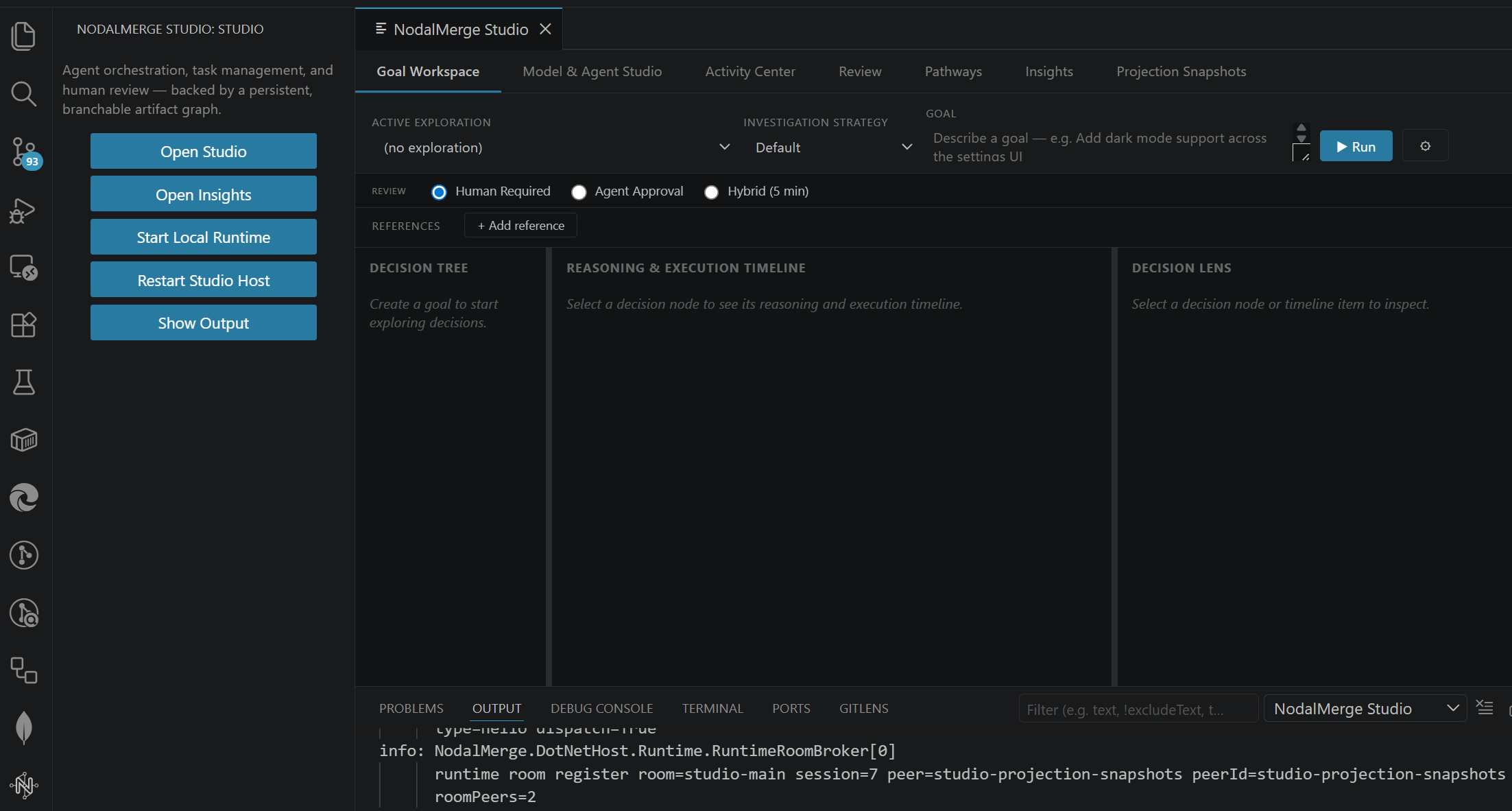
Goal Workspace
The primary surface: create goals, watch the Decision Tree, inspect any node in the Decision Lens.Topbar
- Active Exploration — pick which session’s decision tree to view
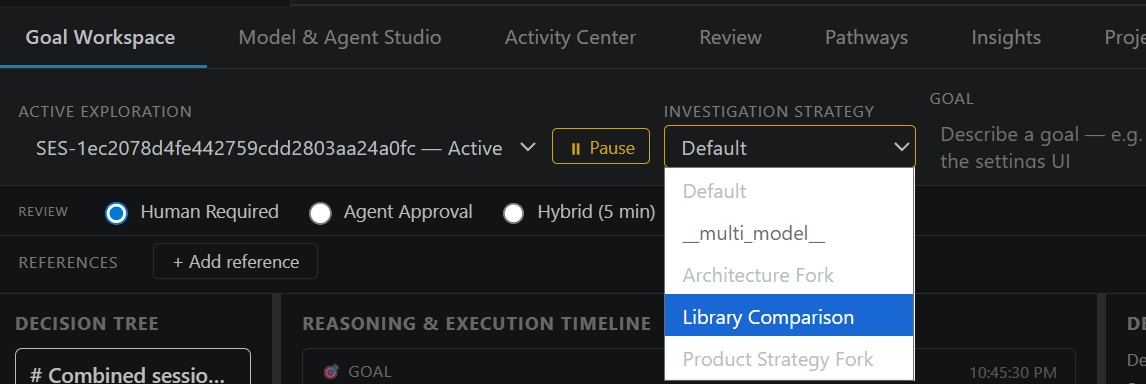
- Exploration Strategy —
Multi-Agent Fanout(or another topology template) for a normal run, or one of four experiment strategies:Multi-Model Comparison,Architecture Fork,Library Comparison,Product Strategy Fork - Goal — the goal text
- ▶ Run — launches the goal under the selected strategy, review policy, and target
- ⚙ Settings — toggles the Exploration Settings panel below
Review / Target row (always visible under the topbar)
- Review: Human Required / Agent Approval / Hybrid (5 min) — sets this goal’s review policy
- Target: Candidate Branch / Direct — only shown when promotion branches are enabled session-wide; overrides the session default per goal
- Plan depth — per-goal override of the global Max plan depth (below). Pre-filled with the current default; change it to let just this goal plan recursively (or hold it flat) without touching the session-wide setting. See Guides → Multi-agent profiles → Recursive planning.
Exploration Settings panel (⚙)
Session-wide settings (with per-goal overrides where noted), grouped as they appear in the panel:- Workspace / Repository — the folder Studio operates against, the replication room it’s bound to, and a Re-link action.
- Scheduling — Auto-select agent profiles by capability (checkbox), Max concurrent workers, Scheduler poll interval (ms).
- Max auto-retries — how many automated attempts (review-rejection revises and
worker failures) a work unit gets before it dead-letters for a human.
1= one shot then escalate; higher = more lenient auto-fixing. Human/explicit retries are never capped. - Planning → Max plan depth —
1= flat fan-out (every slice is a worker).2+lets a planner mark a slice compound so a sub-planner re-slices it, up to this many layers (overridable per goal via Plan depth above). See Recursive planning. - Pipeline Gates — Require build before proposal / Require tests before proposal / Reject worker proposals with no file changes (server-side policy gates, not manual triggers).
- Merge & Conflict — Block conflicting ops, Auto-requeue a losing work unit when all merge strategies fail, and Stage AgentApproval/Hybrid goals on a shared candidate branch before promoting to main.
- Git Integration (opt-in) — Allow agents to create git commits / push branches on export.
Fork config panel (appears for any of the 4 experiment strategies)
Per fork: a Profile dropdown and an optional Constraint text field (e.g. “use gRPC instead of REST” for an Architecture Fork). + Add Fork adds another entry.Multi-Model Comparison picks 2 orchestrator profiles automatically and
ignores the constraint field; the other three require every fork to have a
constraint (the backend rejects the request otherwise).
Decision Tree (left column)
- Click a node to select it (loads its timeline + Decision Lens)
- Right-click → Fork Hypothesis, Re-explore, Fork from latest candidate, Fork from Known Good
- A parent with 2+ forks shows an N forks badge + Compare Results link
- A counterfactual node shows a Counterfactual badge + Compare with Original link
Reasoning & Execution Timeline (middle column)
Click any artifact or event to load it into the Decision Lens.Decision Lens (right column) — up to four tabs
Metadata tab (always present, active by default):- Fork Hypothesis / Re-explore / Fork from latest candidate / Fork from Known Good — same actions as the tree’s context menu. Fork from Known Good lists the node’s branch’s marked checkpoints, then a goal and profile, then forks a new work unit seeded from that checkpoint’s content.
- ↺ Run with different model (completed/merged nodes) — creates a counterfactual: re-runs this node’s latest proposal under a different profile
- ⏸ Pause & Redirect (running nodes) — pauses the agent, prompts for a constraint, forks a sibling that resumes with it
- ↳ Fork from here (running nodes) — forks a sibling from this node’s current state with a new goal + optional constraint
- Loads the goal, plan, assumptions, constraints, evidence, execution results, allowed tools, and model for this node — the structured decision audit, never raw prompt text
- 📋 Copy as Markdown — copies the above to clipboard
- Constraints proposed by domain observers appear in the Artifacts chain here,
identifiable by their title prefix (e.g.,
[SecurityAgent] Missing rate-limit on /api/auth). See Guides → Domain observers.
- The full agent conversation for this node — one entry per cycle, newest first, with tool calls/results as collapsible blocks and a token-usage summary. Polls live every 2s while the node is running.
- Decision status, source, confidence, files touched, plus Open in Review →, Fork Hypothesis from here, Restore workspace, Compare with…
- The first time a node with a pending candidate is selected, this tab auto-activates so reviewing it is a single click — but it’s a tab like any other, not a takeover: Metadata, Context, and Conversation stay one click away, and re-selecting the same node won’t jump you back to it a second time.
Compare Results view (experiments)
- Click a fork card to select it
- Pick Winner — approves the selected fork’s latest proposal and rejects every other fork’s latest proposal
- Reset — clears the selection
- 📋 View proposals — opens the fork’s proposals
Compare with Original view (counterfactuals)
Side-by-side original vs. counterfactual: model/provider, status, confidence, files touched, diff summary for each, plus a “which was better” line when set.Activity Center
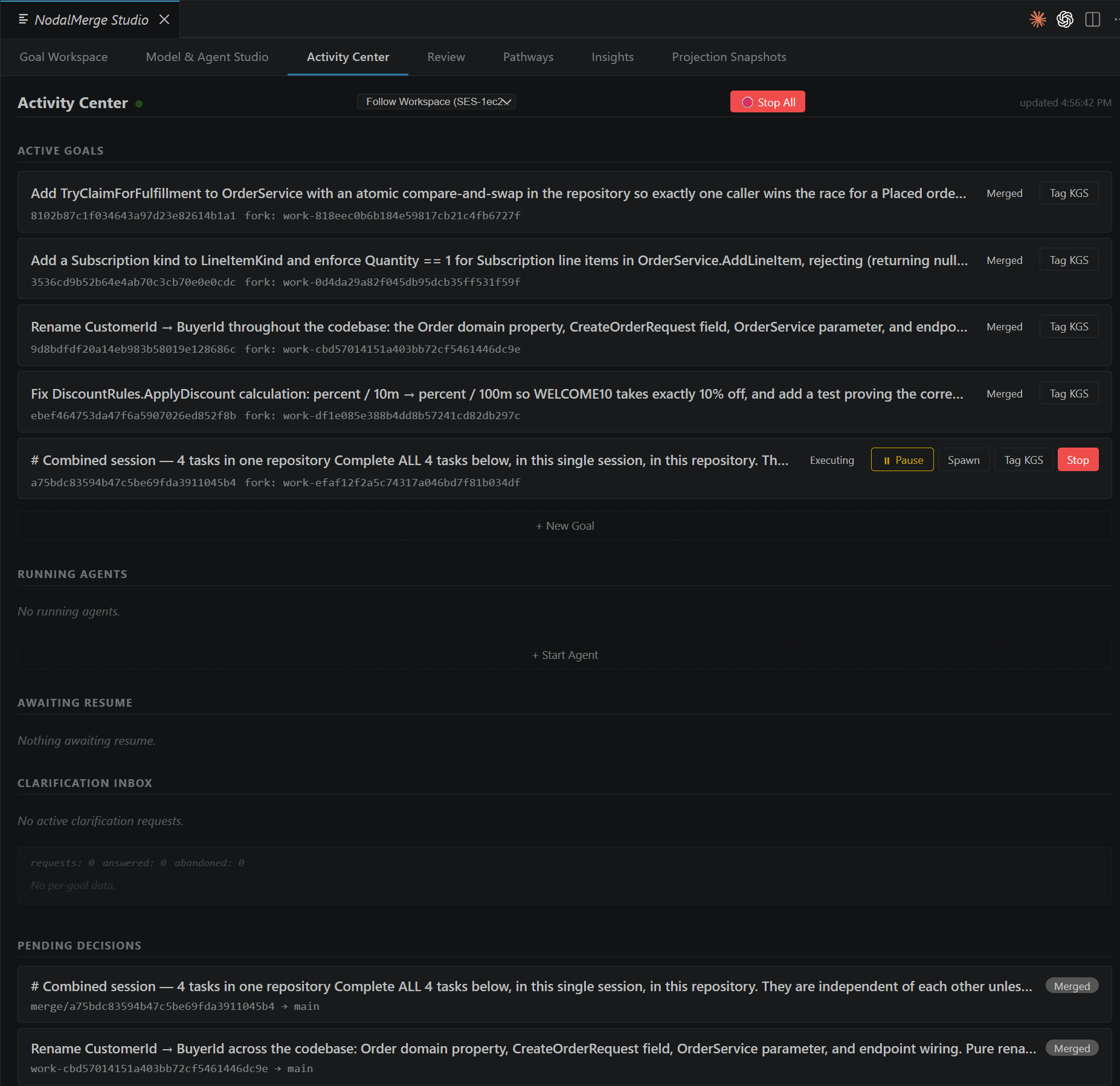
Secondary surface for direct work-unit/agent lifecycle management without going through the Goal Workspace’s Decision Tree.- Session override — filter this panel to one session
- + New Goal — create a work unit via sequential prompts: goal → owner → review policy → (if promotion branches are on) target (Candidate / Direct)
- Active Goals: Spawn (start an agent) · View Conflict → (when Reviewing) · ↺ Requeue (when Cancelled — un-cancels the goal and resumes it; a leaf work unit is re-queued for a worker, a fan-out parent re-attempts reconciliation. Resupplies LLM credentials from the configured Orchestrator profile first, since a cancel/requeue cycle commonly spans a restart of the local runtime)
- Running Agents: + Start Agent · Pause · Resume · ↺ Resume (for
Interruptedagents after a host restart) · Stop. Agents spawned by a connected headless peer appear in this list alongside interactively spawned agents and can be paused, resumed, or stopped from here — see Guides → Headless peer. - Pending Decisions: Review Decision →
- Candidate Conflicts / Task Conflicts (only shown when promotion branches are on):
when two proposals touch the same file paths on the shared
candidatebranch (or two fan-out sibling work units conflict on a per-goal basis), each conflict lists the losing proposal against what’s currently on the candidate branch, plus: View Conflict Diff (opens a read-only side-by-side diff per conflicting file — candidate content vs. the losing proposal’s content), Reconcile (inline steering-notes field, then spawns a dedicated reconciliation work unit seeded from the candidate branch and the conflicting proposals’ diffs — auto-spawns if a Reconciler profile is configured in Model & Agent Studio → Agent Topology, otherwise it’s created for you to Spawn manually from Active Goals), Restart (rejects the losing proposal and restarts its goal in Revert mode — always Revert, not Revise, so the retry starts from a clean branch snapshot rather than building on content that just lost the conflict), and Resolve manually (submit resolved file content directly; it’s written to the candidate branch and recorded as a synthetic merged proposal that supersedes the losing ones). Task Conflicts work the same way but are scoped to one parent work unit’s sibling slices rather than the whole session. See Concepts → Trust & autonomy § Reconciling candidate conflicts. - Blocked Explorations (dead-letter queue): Retry (when attempts remain) ·
Continue (
MaxIterationsExceededonly, also gated on attempts remaining — resumes the same work unit with its own prior conversation reconstructed and a fresh iteration budget, instead of starting over) · Re-plan the slice / Re-plan from scratch (always available regardless of attempt count — decomposes the failed goal into fresh, independently-budgeted sub-slices and marks the originalCancelled, rather than resuming it)
Model & Agent Studio
Configuration surface — profiles, agent topology, session-wide defaults, and live participant monitoring. Six tabs.Profiles tab
Table of agent profiles with Edit / Delete per row, + Add Profile. The form: ID, label, domain, LLM provider (VS Code LM / OpenAI-compatible / Anthropic), model (with ↑ Refresh to fetch live model list), base URL + API key (hidden for VS Code LM), system prompt hint. Save Profiles persists everything.Agent Topology tab
Topology templates — which profile fills each role (Orchestrator / Planner / Worker / Reviewer) for a run: Set Default, Edit, Delete, + Add Topology. Save Strategies persists. (This tab was called “Exploration Strategies” elsewhere in these docs and in the Quick Explore tab’s own dropdown label — same templates, current tab label is Agent Topology.)Quick Explore tab
One-off run: topology, goal, “run automated review before human gate” checkbox, ▶ Quick Explore.Pipeline Profiles tab
Stage-specific agent behavior (Orchestrate/Plan/Execute/Review/Merge): allowed tools, file-scope patterns, max iterations, system prompt. Edit / + Add Pipeline Profile.Session Defaults tab
- Default Review Policy dropdown
- Use candidate branch checkbox (session-wide promotion branch toggle)
- ↑ Promote to Main — applies
candidate→main; enabled only when the toggle above is on - Save Session Defaults
Domain observer enable/disable is config-file only — there is no toggle in this
panel. Set
Workspace:EnabledDomainAgents in appsettings.json and restart the
host, or override per-goal at agent spawn time. See
Guides → Domain observers.Participants tab
A live table — ID (truncated, hover for full), Kind, Status (running / connected / idle), Work Unit, Activity / Type — covering
both in-process agents (their current work-unit activity) and connected room peers
(their declared peer type). ↻ Refresh re-polls; Stop ends that participant
after a confirmation prompt. This is the interactive surface for the same
multi-peer model documented in
Concepts → Architecture § Multi-peer goal sourcing —
a persistent headless peer watching logs or alerts shows up here exactly like an
interactively-spawned agent.
Decision Convergence
The merge-review gate — labeled Review in the extension’s tab bar. Two modes depending on the proposal/work-unit state.Proposal review mode
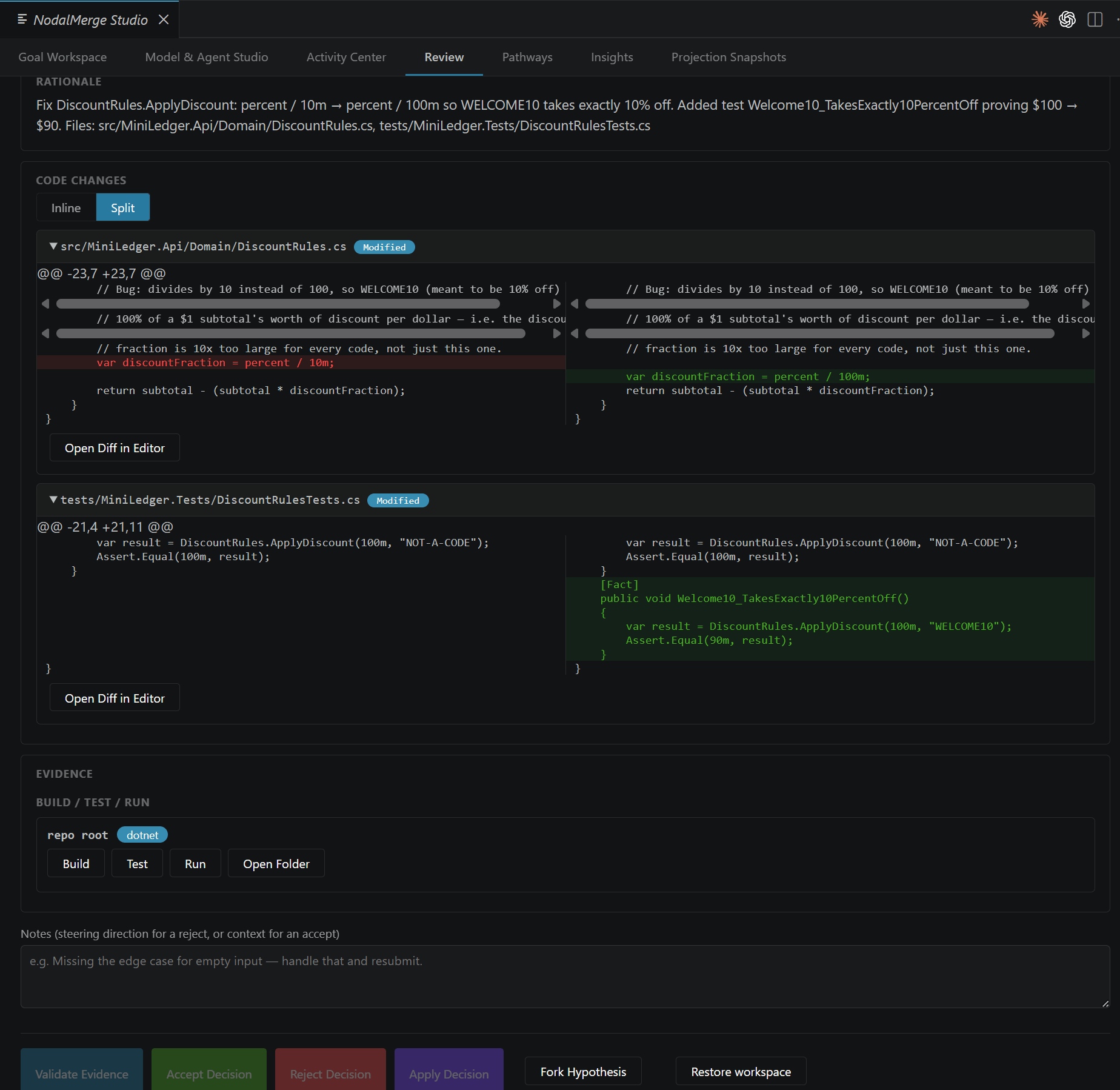
- Status badge, source/target branch, confidence, goal, summary, rationale
- Code Changes: Inline / Split diff toggle, per-file expand, View Diff (read-only), Edit File (opens the file for direct editing; once you save, an inline Resync Workspace button appears on that row to pull your edit back into the work unit’s branch before deciding)
- Evidence: build/test results, download full output when truncated
- Converged Decision section (if synthesized from multiple candidates): constituent proposal cards
- Validate Evidence · Accept Decision · Revise (keep the agent’s current file changes, attach a compacted summary of the almost-correct attempt, and steer it toward the gap) · Revert and Restart (wipe the work unit’s branch back to its pre-attempt snapshot and restart the goal fresh with just your steering note) · Apply Decision · Fork Hypothesis · Restore workspace (read-only pre-change files)
Conflict resolution mode
Reached via NodalMerge: Open Decision Conflict for a single work unit’s own apply-time conflict (distinct from the Activity Center’s candidate/task conflict list above, which is cross-proposal). Hides the Apply/Accept/Reject row and instead shows the conflict report with a per-file Edit File button — edit the conflicting file directly, then an inline Resync Workspace button appears on that row to pull the edit back into the work unit’s branch. There’s still no in-panel “retry the merge” button: once the files are resynced, apply the same proposal via the REST/MCP surface directly (nm_v1_merge_apply /
POST /studio/merges/{id}/apply), or re-propose from the current target state,
which is what the conflict report itself recommends.
Pathways / Trajectory Replay
Two sub-tabs, both scoped to the session in the top-right dropdown (or the workspace session it’s following).Trajectory
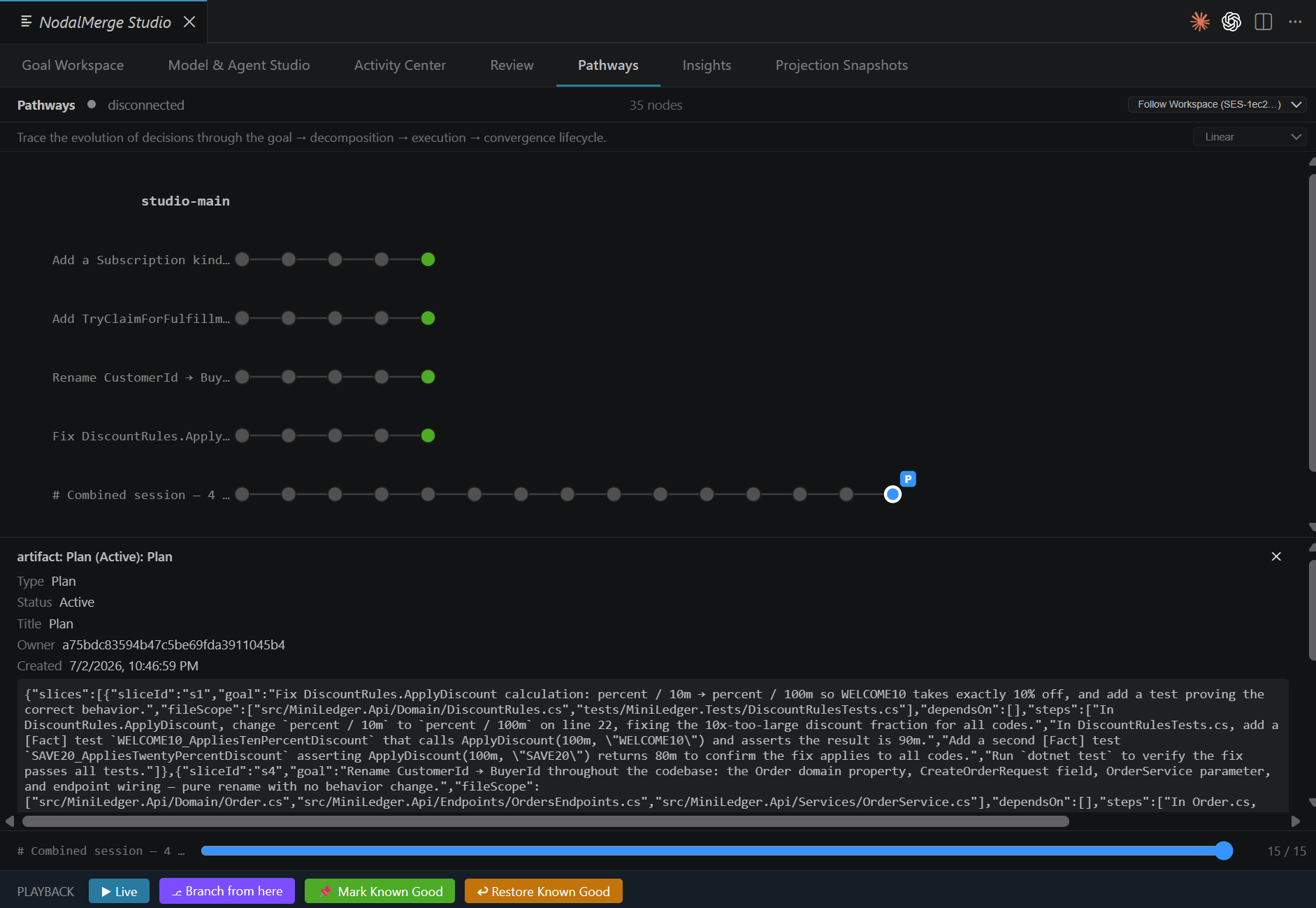
DAG visualization and historical scrubbing.- Replay Mode: Linear / Branch Explorer / Counterfactual
- DAG canvas: click/hover a node for details
- Scrubber: slide through the branch’s timeline (position shown as
N / Total) - Playback bar: ▶ Live (jump to latest) · ⎇ Branch from here (new work unit
seeded from the scrubbed branch’s current content) · 📌 Mark Known Good (label
- save checkpoint) · ↩ Restore Known Good (pick a marked checkpoint for this branch and restore the branch’s files to that point in place)
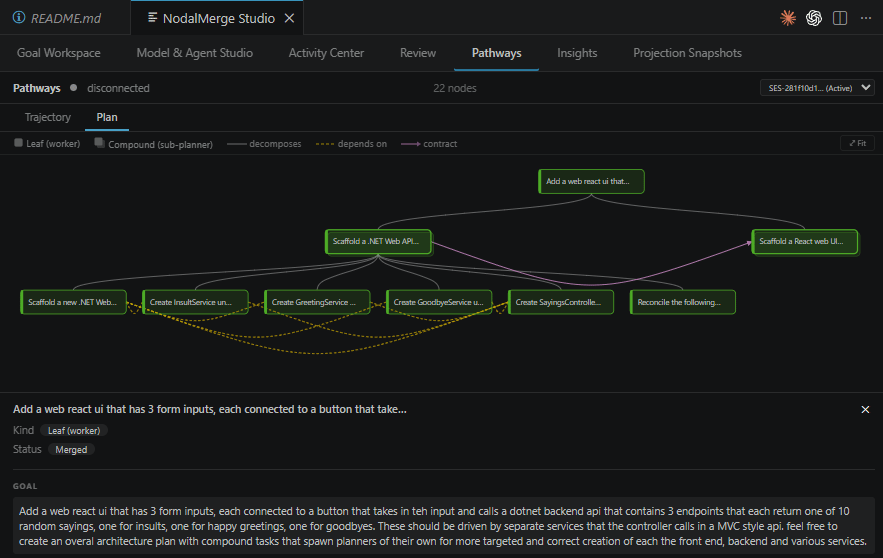
Plan — read-only plan decomposition
The session’s recursive plan as a top-down tree: the root goal at top, its child work units below, recursively. This is deliberately read-only — where you understand the shape of a decomposition; the Goal Workspace Decision Tree is where you act (fork, steer, re-explore).- Nodes — Leaf (worker) vs Compound (sub-planner interior node — drawn as a stacked card). Each node is tinted by its work unit’s status, so you watch a merge climb the tree bottom-up as grandchildren reconcile into their parent and the parent into the root.
- Edges — solid = decomposes (parent → child); dashed amber = depends on
(sibling sequencing); purple arrow = contract (a slice that
providesan interface → the peer thatconsumesit). - Hover a node for its full goal + status; click for the detail drawer — the
full goal plus the slice’s kind, file scope,
provides/consumes, steps, and any related contract descriptions. - Drag to pan, scroll to zoom (around the cursor), ⤢ Fit to frame the whole tree. Your pan/zoom persists as the tree refreshes live.
Insights
Two sub-tabs — Analysis and Constraints — everything manually triggered; nothing here runs on a timer or chains automatically into anything else. For the concepts behind findings and constraint scope, see Guides → Knowledge & constraints.Analysis tab → Run Analysis
Last 30 Days / All Time period selector, then ▶ Run Analysis aggregates outcomes across every goal, work unit, and proposal recorded so far into an overview (session/work-unit counts and status breakdown, overall success rate, average rework cycles, top failure cause, most successful model, most successful topology) plus detail tables: model performance (overall and by pipeline stage), topology-fork win rates (overall and by constraint), failure causes, and review outcomes. This dashboard is itself a registered projection (/studio/projections/RunRetrospective) — see
Architecture → Projections for what that guarantees
about it.
Analysis tab → Findings — knowledge & process improvements
Two ways to populate the queue: Detect Findings (free, instant, deterministic pattern rules) and Run LLM Scan (calls a real model using your own configured credentials — real cost and latency, profile picked from a dropdown of profiles with a model set). The scan works with HTTP model profiles and CLI profiles (claude-cli / codex-cli) — pick a CLI profile and Studio drives it via a one-shot
CLI call server-side. If the model responds but nothing parses into findings, a
toast offers Open raw output to inspect (and hand-fix) the verbatim response in an
untitled JSON document. Findings filter by status (Open / Promoted /
Dismissed / Investigating / All); each has review actions to promote,
dismiss, or mark investigating. What Promote does depends on the finding’s kind: a
Knowledge finding becomes a global Constraint (visible on the Constraints tab and
re-scopable there); a Prompt finding becomes stage-scoped prompt guidance for its
target stage and does not appear on the Constraints tab. A toast on promote names
which happened, and a Promoted finding shows a → Constraint / → prompt guidance for the <stage> stage destination line. See
Knowledge & constraints → what promotion does.
Export Selected writes chosen findings to a portable JSON file (stripped of
repo-specific IDs); Import Findings… brings findings exported from another repo
back in.
Constraints tab
The durable guidance folded into every agent’s kickoff prompt, listed and grouped by reach (who shares it) and application (which repositories it affects). Only global constraints appear here — promoted findings and manually-added ones; constraints an agent or domain observer recorded against a work unit are lineage-scoped and live in that node’s Decision Lens → Context tab instead, not here.- Checkbox per constraint — unchecking turns it off for you only; it stays active for every other peer and the shared constraint is untouched. The toggle is peer-private and never replicated.
- Reach / Applies-to dropdowns — two inline selects on each card set the full 2×2 scope: Reach (Workgroup / Private) × Applies to (All repositories / This repository). Changing either re-routes the constraint immediately and the card moves to its new group. This is how you correct a promoted finding’s default scope or narrow a constraint to a local/private override — see Knowledge & constraints → re-scoping.
- + Add a constraint — expands an inline form: Title, body, a reach radio (Workgroup (shared) / Private (only me)), and an Only this repository checkbox. Those two controls are the full 2×2 scope; the form resolves the current repository server-side, so you never handle a repository ID. See Knowledge & constraints → scope for what each combination means.
- Proposed by observers & agents (section below the global list) — the work-unit-owned constraints a domain observer or agent recorded. Each shows its scope badge and source work unit with a Promote button that mints a shared global copy (Workgroup reach, scoped to the source’s repository); once promoted, the row is badged promoted instead. This is the governed bridge from a lineage-local observation to organization-wide policy — see Knowledge & constraints → promoting a lineage constraint.